
The homeowner in Menifee had been dealing with it for about two weeks — a Samsung WF45R6100AW front-loader that finished every cycle with four or five inches of standing water at the bottom of the drum. She'd been scooping it out with a bucket and running an extra spin cycle, which helped sometimes and didn't other times. Error code 5E (Samsung's drain error) was showing up intermittently. By the time she called us she was hand-wringing clothes before putting them in the dryer.
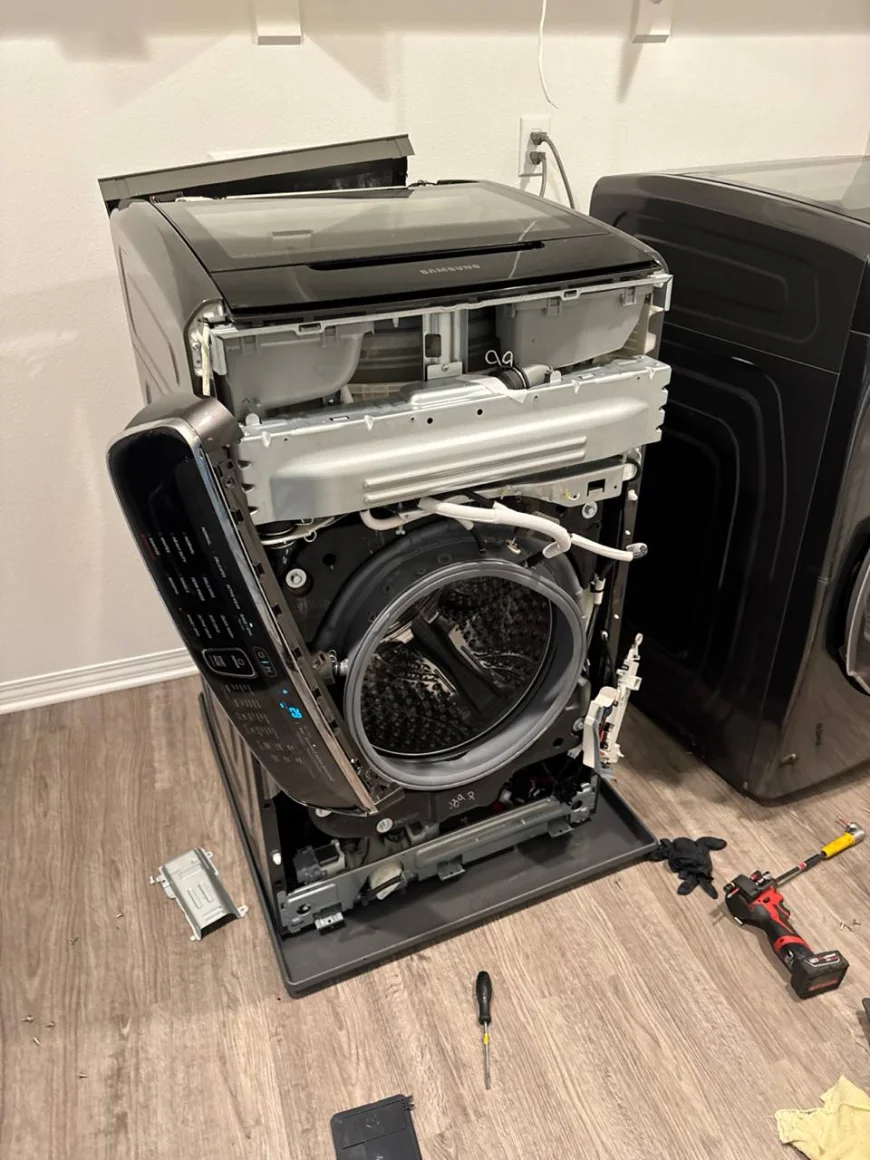
Drainage problems on front-loaders look dramatic — standing water, wet clothes, error codes — but they're usually straightforward to diagnose once you know where to look.
Starting the right way: not the drain pump
The first thing most people assume when a washer won't drain is that the drain pump has failed. Sometimes that's true. But the pump is downstream of the filter, and jumping straight to a pump replacement without checking the filter first is how you end up replacing a part that was fine and then having the same problem two weeks later because the real blockage is still there.
Every Samsung front-loader — and most front-loaders in general — has a debris filter (also called a pump filter or coin trap) at the bottom front of the machine, behind a small access panel. It's designed to catch items that come out of pockets: coins, keys, hair ties, paper clips. The filter needs to be cleaned every few months, but a lot of people don't know it exists until something goes wrong.
We opened the access panel and found a small drain tube — you unclip this and let the residual water drain into a towel before unscrewing the filter cap. The cap came out with significant resistance, which is itself a sign it hadn't been removed in a long time. Inside: a dense matted plug of lint, a quarter, a dime, and what appeared to be a small piece of wire from a bra underwire.
The bra underwire is a front-loader classic. Underwires are just the right size to slip through the drum holes and get lodged in the pump or filter. If you wash bras in a front-loader, put them in a mesh laundry bag first — it takes thirty seconds and saves a repair call.
After clearing the filter
We cleaned the filter housing, rinsed the filter itself, checked the filter cap O-ring (it was intact — a cracked O-ring would cause a slow water leak under the machine), and reinstalled everything. Then we ran a diagnostic cycle from the Samsung service menu — holding down the Temp and Delay End buttons simultaneously puts the machine into service mode on most Samsung front-loaders, which lets you trigger individual components like the drain pump directly.
The pump ran, and water drained quickly and completely. We ran a full normal wash cycle with a small load to confirm. No standing water, no 5E code, spin speed normal. Total time on site: about 40 minutes.
What happens when the filter alone isn't the problem
About one in four washer drainage calls we get actually does involve the pump rather than the filter. The most common scenario: the filter was badly blocked for a long time, the pump motor strained against the restriction, and eventually burned out. You clear the filter, but the pump is now dead.
Pump failure has a distinct sound — or rather, a distinct absence of sound. During drain, you should hear a clear hum from the pump motor. If you hear nothing, or hear a faint click but no hum, the pump has failed. Samsung drain pumps are a relatively affordable part and the replacement is straightforward: disconnect the drain hose, unscrew two or three mounting bolts, swap the connector to the new pump, reassemble.
Less commonly, drainage problems stem from a kinked or partially collapsed drain hose (especially if the washer was recently moved), a blocked standpipe (the drain pipe in the wall), or — on older machines — a worn door seal that's partially blocking the drum opening and slowing water evacuation. We check all of these on every drainage call because finding the primary problem without finding a contributing secondary problem just means a callback.
How to clean your drain pump filter yourself
This is one of the more DIY-friendly washer maintenance tasks:
- Unplug the washer or turn off the circuit breaker.
- Locate the access panel at the bottom front — it either pops off or has one or two screws. On Samsung front-loaders it's typically on the lower right.
- Place a shallow pan or folded towels under the panel before opening it. There will be residual water.
- Unclip the small drain tube (if present), point it into your pan, and let it drain fully.
- Turn the filter cap counterclockwise to remove. Pull it out slowly — more water will follow.
- Clear any debris from the filter and from inside the housing. A toothbrush helps with the filter mesh.
- Check the O-ring on the filter cap. If it's cracked, dried out, or missing, replace it before reinstalling.
- Reinstall the filter cap hand-tight, reclip the drain tube, replace the panel.
- Run a short rinse-and-spin cycle and watch for leaks around the panel.
Samsung recommends cleaning this filter monthly if you wash frequently, or at minimum every three months. Most people never do it, which is why drain calls are one of the most common washer repairs we handle.
Error codes worth knowing
Samsung front-loaders communicate through error codes, and knowing what they mean can save you time when you call a technician:
- 5E / SE — Drain error. Start with the filter.
- UE / U6 — Unbalanced load. Redistribute laundry and run again before assuming a mechanical problem.
- 4E / 4C — Water supply error. Check that the inlet hoses are fully open and the water pressure is adequate.
- nF / nF1 — Water not filling properly. Same direction as 4E.
- dC / dE — Door latch error. Try closing the door firmly. If it persists, the door latch or control board needs attention.
- 3E / 3C — Motor error. This one needs a technician.
Washer draining slowly — or not at all?
Same-day washer repair across Riverside & Orange County. We'll have it sorted today.
Schedule now